
Custom software development
Custom software
made for your work.
When off-the-shelf software makes your team work around it, we build software that fits. Production systems, event and volunteer management, scheduling and records for businesses and nonprofits across the Adirondacks, connected to your website and ADA/WCAG compliant for everyone who uses it.
Custom software development
When nothing on the market fits
Most software is built for the average customer. If your work has its own steps, its own paperwork and its own busy season, you end up paying for features you never use and keeping the important details in spreadsheets on the side.
We write custom software by hand, screen by screen, around the way your team already works. It runs in a web browser on computers, tablets and phones, it connects to your website, and it grows with you as your needs change.
Case study: Adirondack Film Productions
Film Production System from first draft to final cut
Adirondack Film Productions needed one place to run a production: scripts, schedules, cast and crew, locations, releases, budgets and payments. Nothing on the market fit a small regional studio, so we built the Film Production System around the way their team works.
- Projects and episodes
- Script writing
- Gantt chart
- Cast, crew and releases
- Budgets and payments
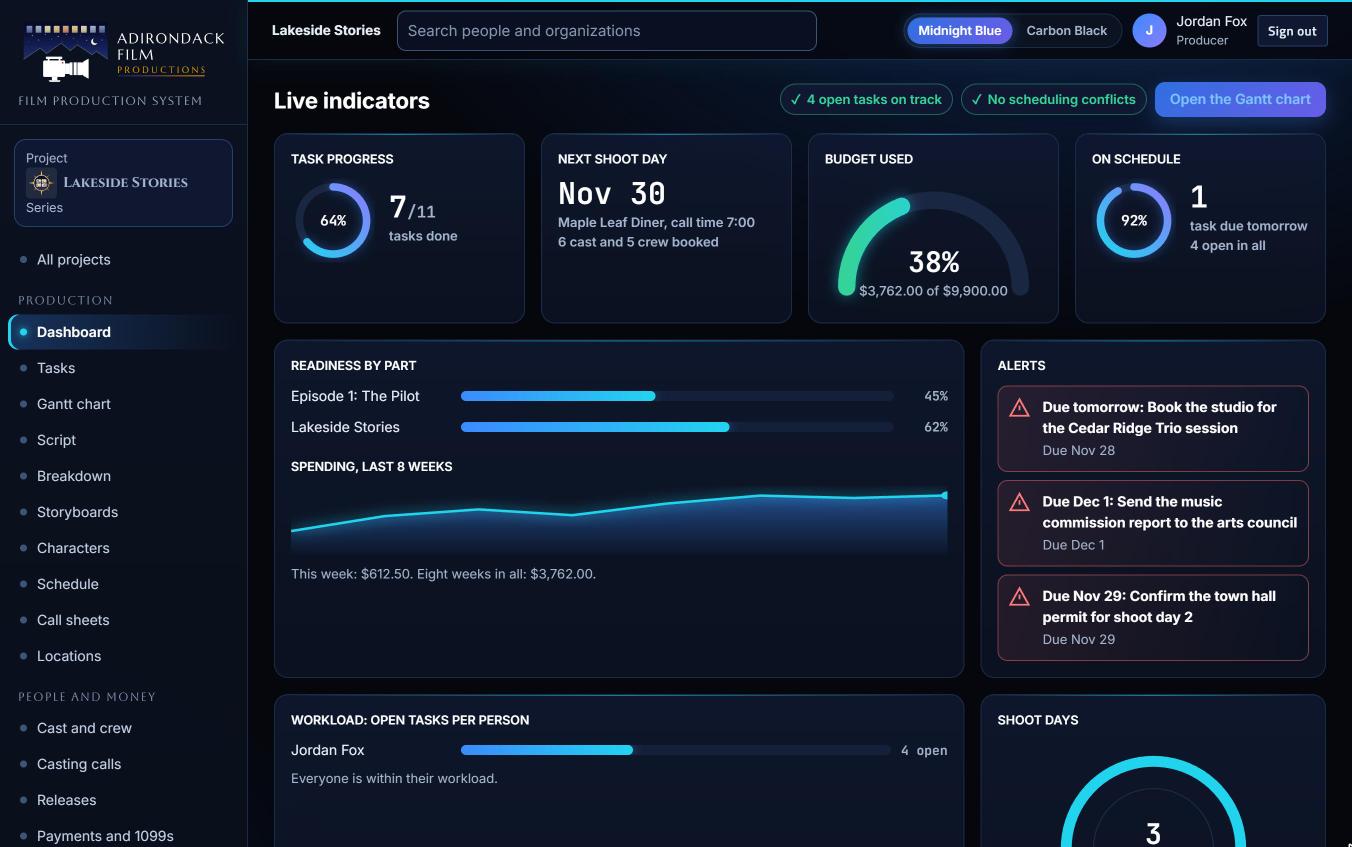
- Live indicators show task progress, budget used, upcoming deadlines and scheduling conflicts at a glance
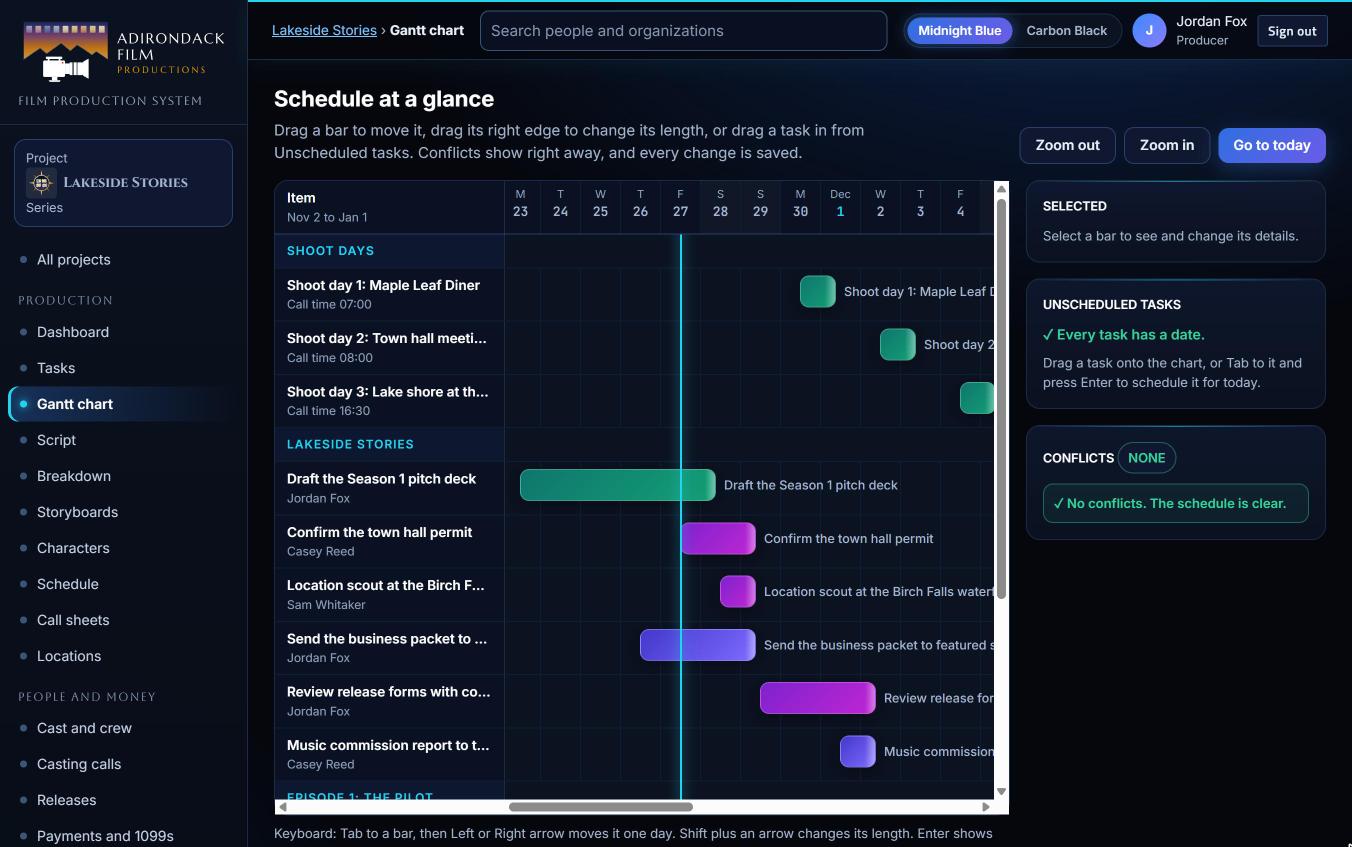
- A drag-and-drop Gantt chart flags conflicts the moment a task moves, and works from the keyboard too
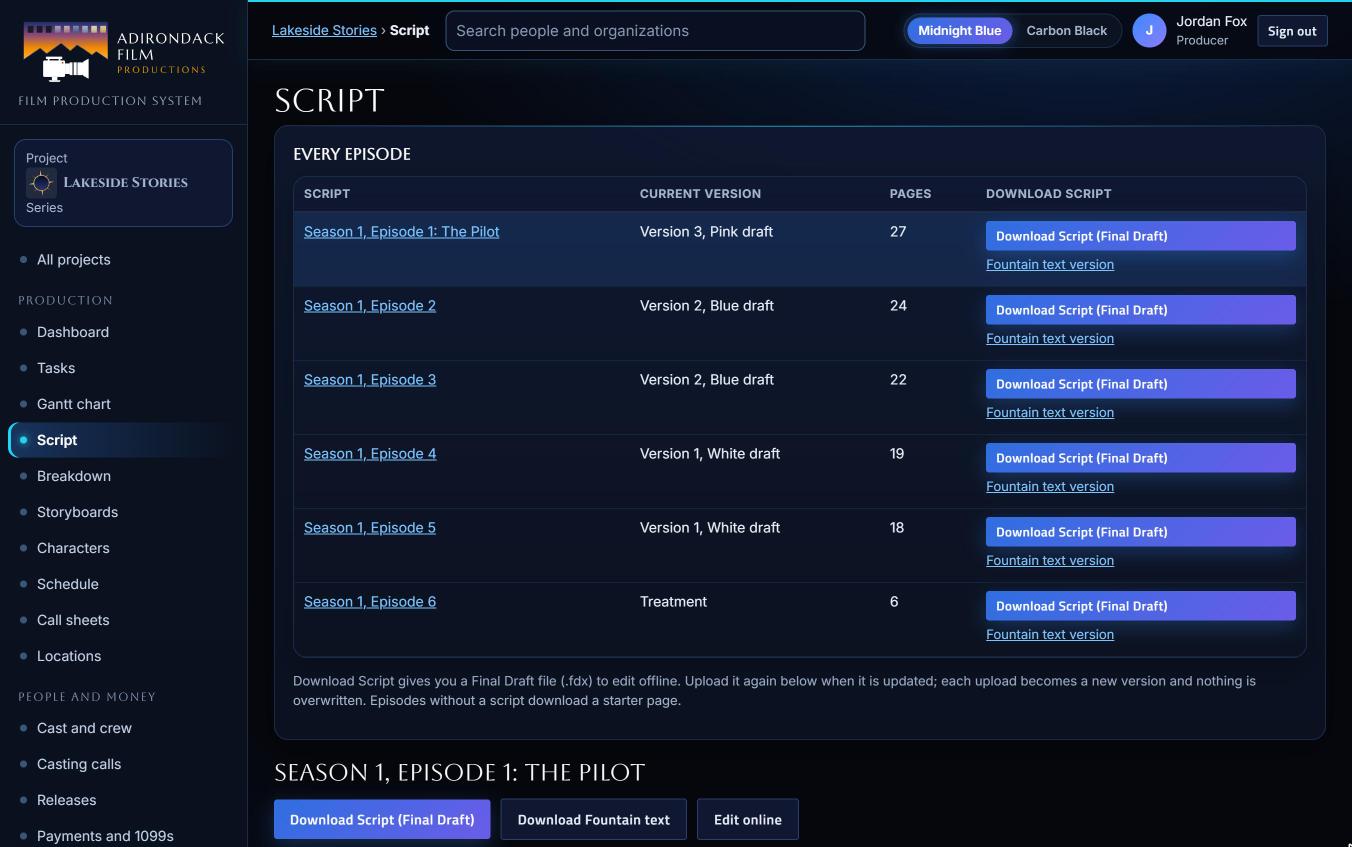
- Every script downloads as a Final Draft file for offline writing, then uploads back as a new version
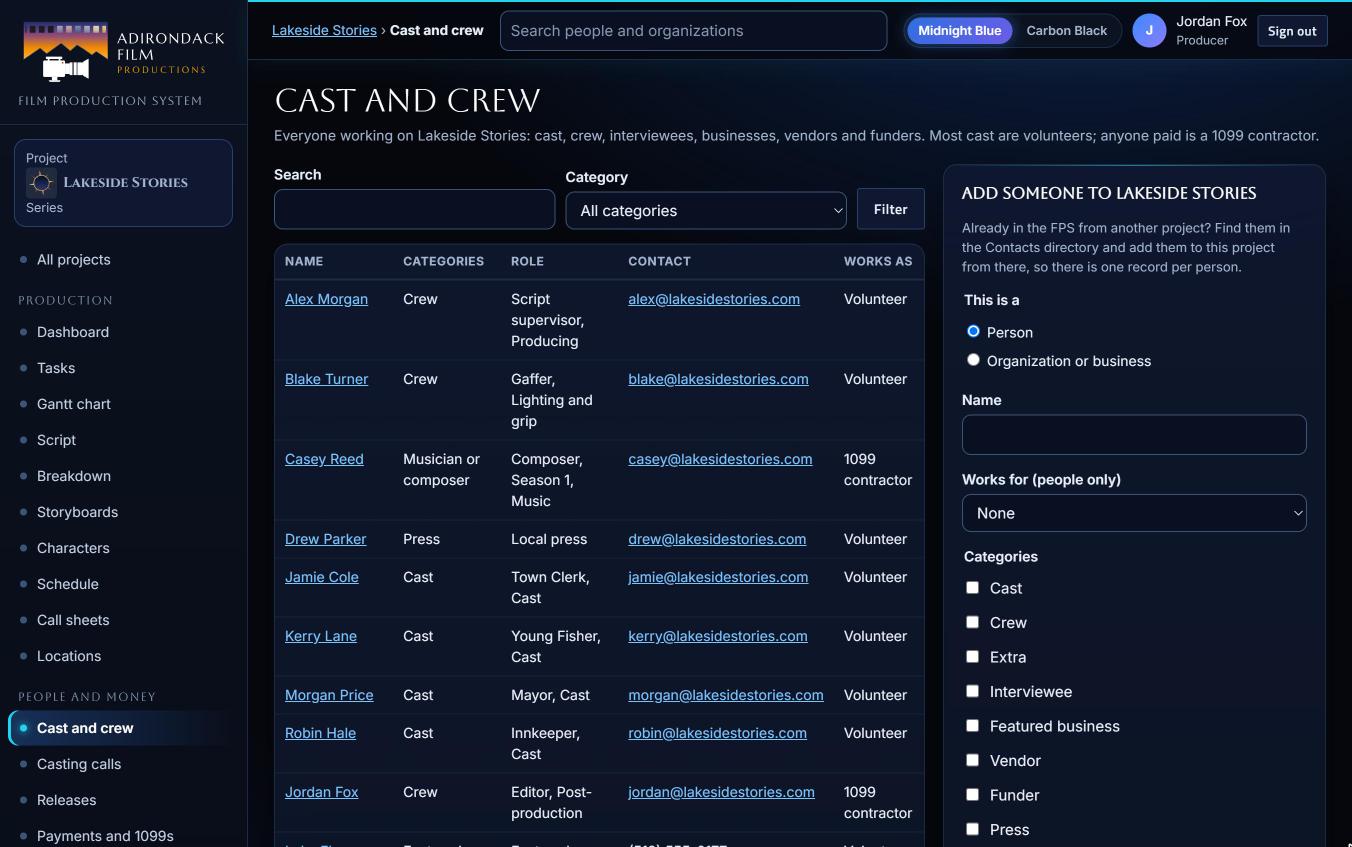
- Cast, crew, businesses and funders share one directory, with one record per person across every project
- Breakdowns, storyboards, call sheets, locations and signed releases stay with the project they belong to
Dashboard
Live indicators
The project dashboard opens on what needs attention today: tasks done, budget used, the next shoot day, readiness by episode and spending over the last eight weeks. Alerts list what is due next, in plain words.
Gantt chart
Drag-and-drop scheduling
Shoot days and tasks sit on one timeline. Drag a bar to move it or stretch it to change its length, and any conflict shows right away. Tasks with no date wait in their own list until they are scheduled.
Scripts
Scripts and versions
Every episode has its script, its current draft and its page count. Writers work online or download a Final Draft file, then upload the update. Each upload becomes a new version, so nothing is ever written over.
Cast and crew
Cast and crew directory
Cast, crew, interviewees, featured businesses, vendors and funders, each with their role on the project and how they work with the studio, whether as a volunteer or a paid contractor.
Case study: Adirondack Nature Festival for People with Disabilities
Festival EMS for volunteer teams
The Adirondack Nature Festival for People with Disabilities runs on volunteers spread across the large grounds of the Paul Smith's College VIC. The Event Management System we built handles sponsors, vendors, programs and guests, and its volunteer tools keep every station covered on festival day.
- Volunteer portal
- Shifts by hour
- Station map
- Online orientation
- Festival day check-in
- Volunteer sign-ups from the website arrive as pending, and approving one sends a welcome email
- Volunteers sign in to their own portal to choose shifts, finish orientation and upload credentials such as first aid
- A map of the grounds shows who is where, hour by hour, and each station says Full or Short in words
- Coordinators can see every station at once, which matters for safety on a large property
- Volunteers check in on festival day with a personal pass code on a phone, tablet or laptop
- Gauges run from red to green, and every chart can also be shown as a table of numbers
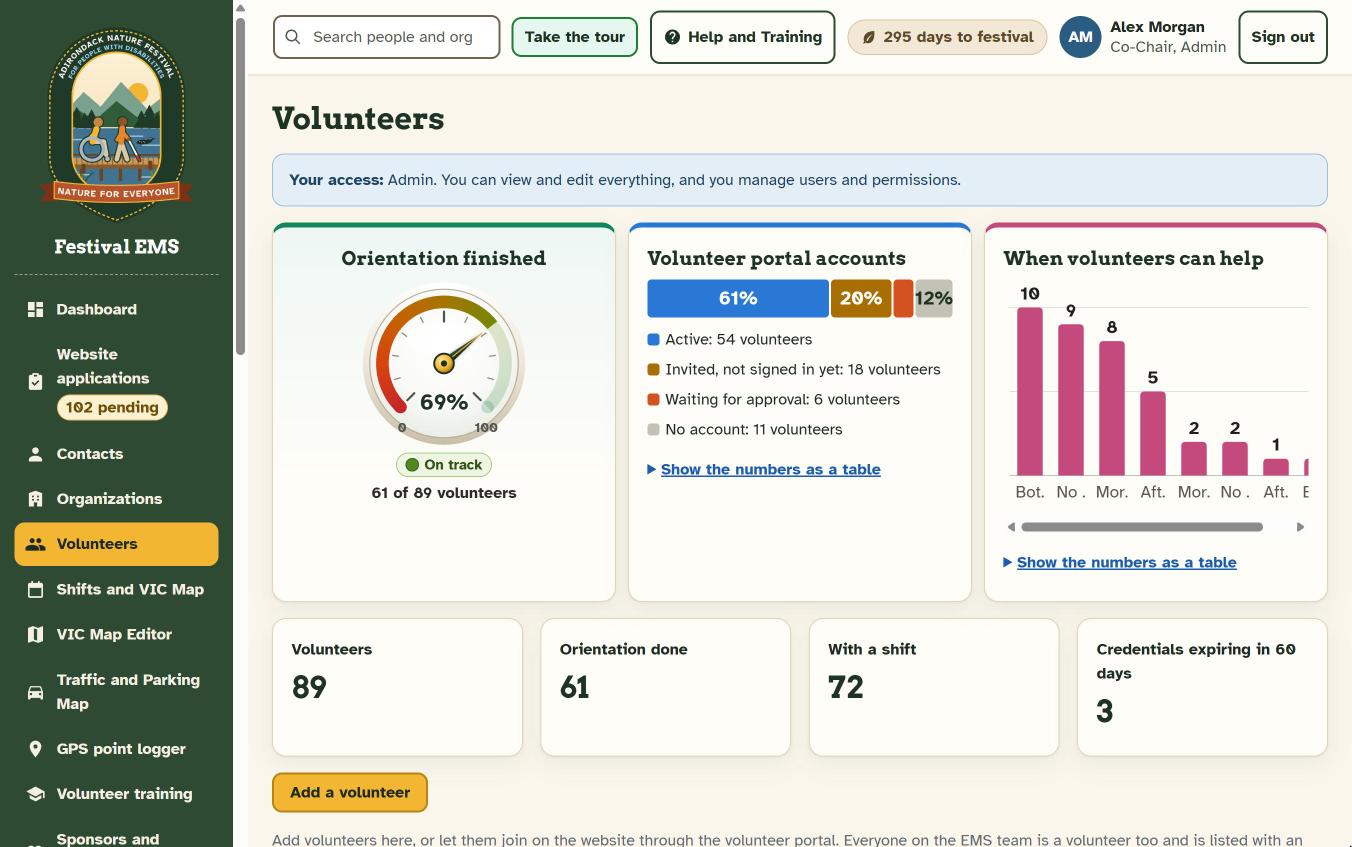
Volunteer overview
Volunteer overview
How many volunteers have finished orientation, who has a portal account, when people are free to help and whose credentials expire soon, all on one screen.
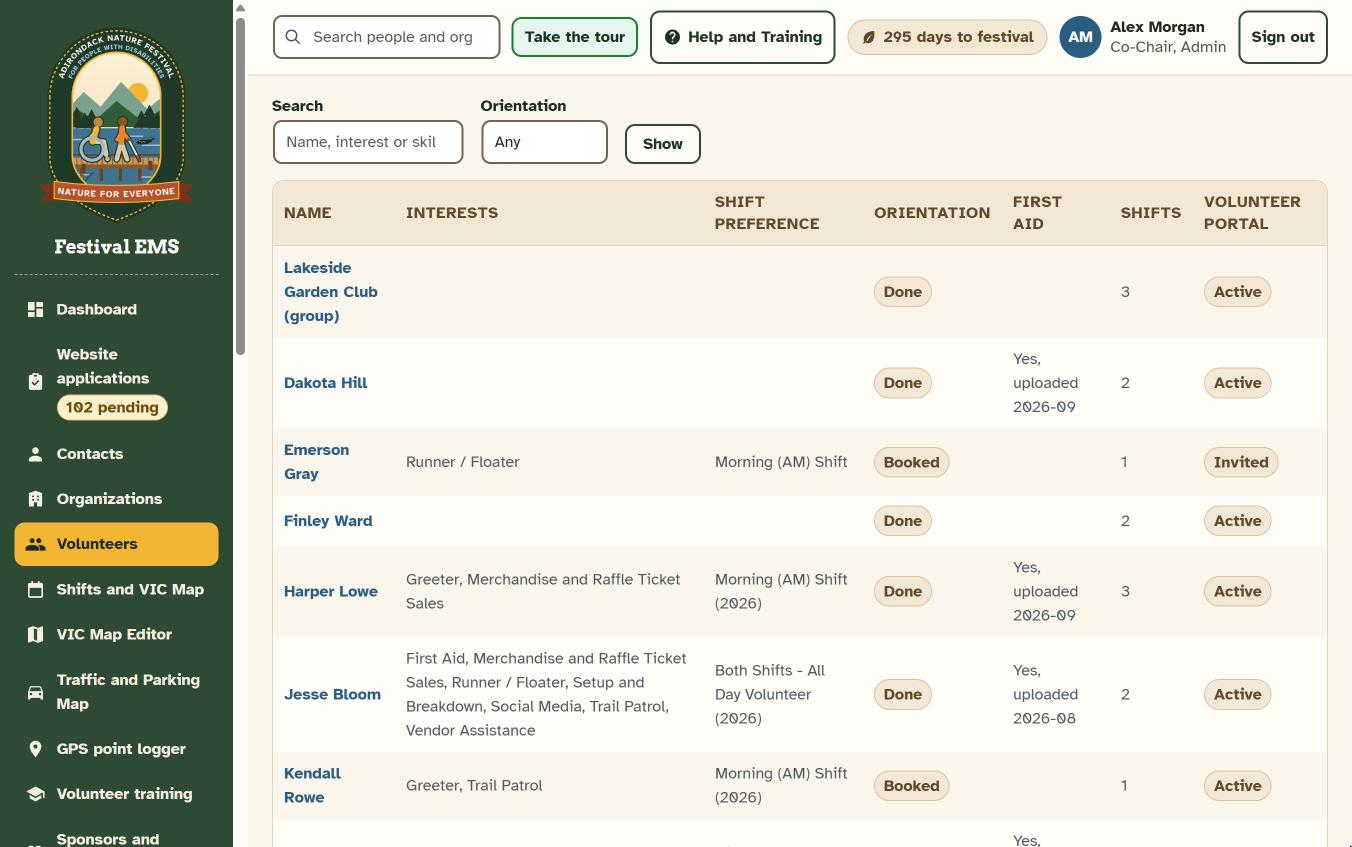
Volunteer list
Every volunteer, one list
Interests, shift preference, orientation, first aid credentials, shifts and portal status for each volunteer. Search by name, interest or skill, and open anyone to invite them to the portal.
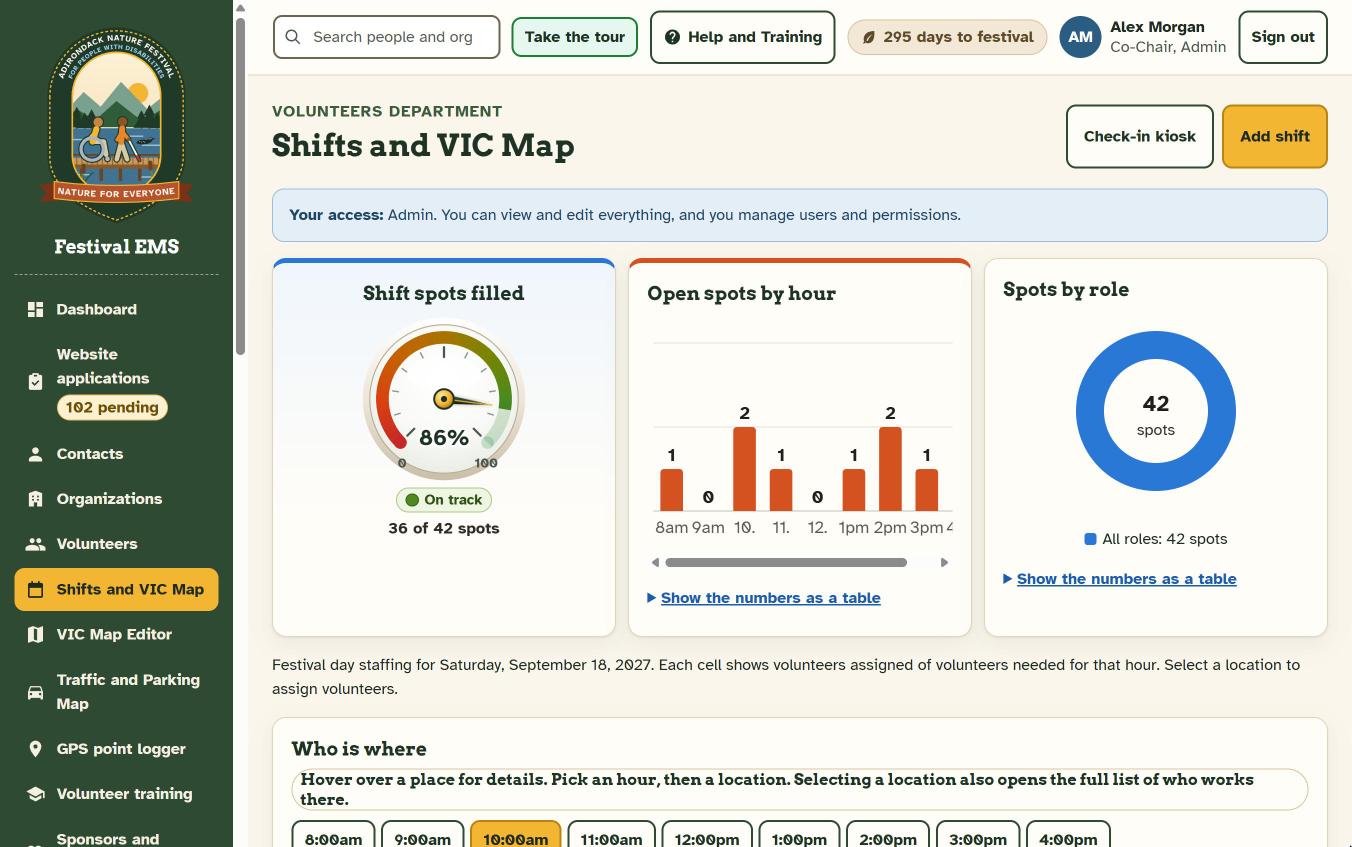
Shift planning
Shift planning
See how many shift spots are filled, which hours still need people and which roles are covered. A check-in kiosk opens from the same page on festival day.
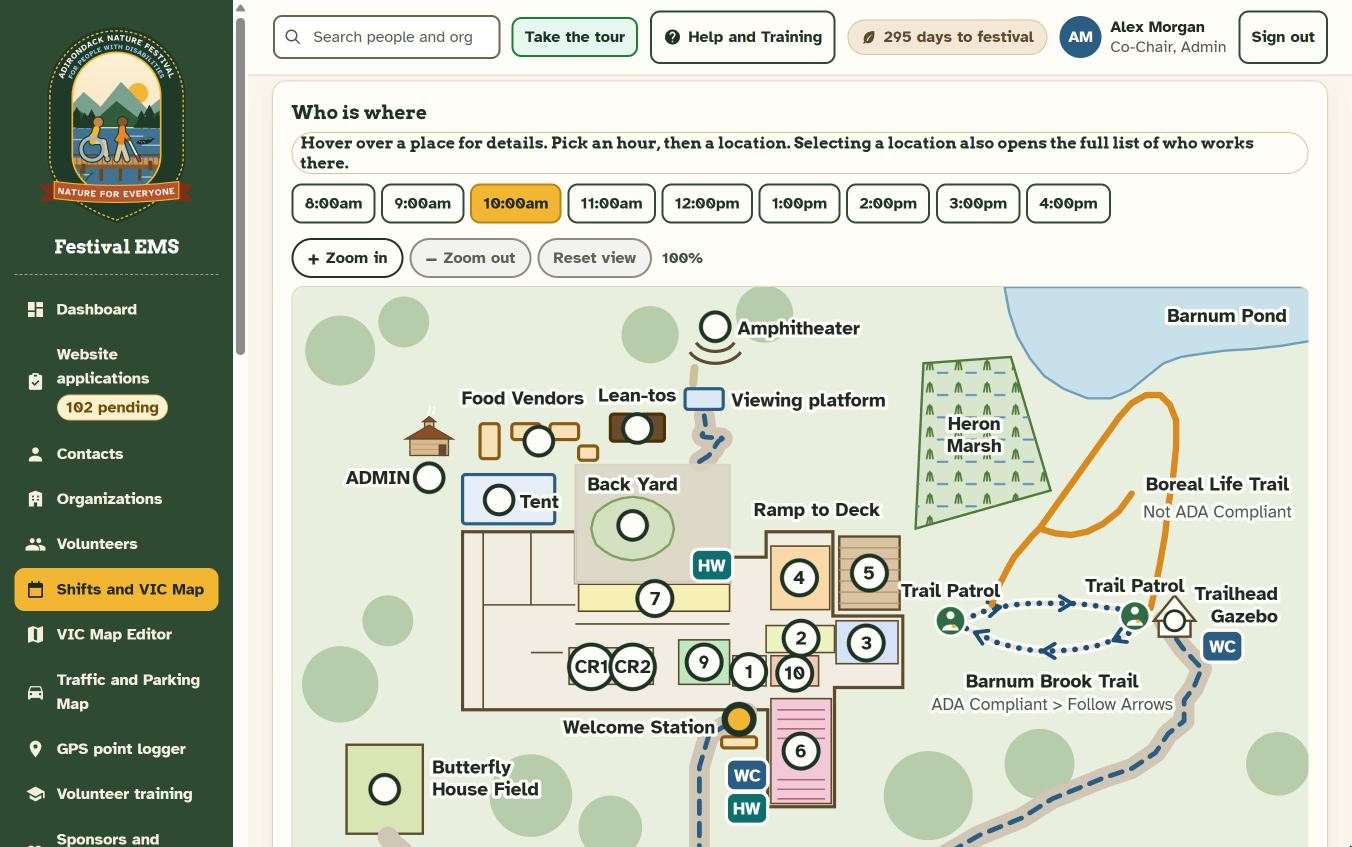
Who is where map
Who is where
Pick an hour, then a station on the map of the grounds to see who is working there. Hover over any place for its details. Changes to the map show everywhere at once, for staff and for guests.
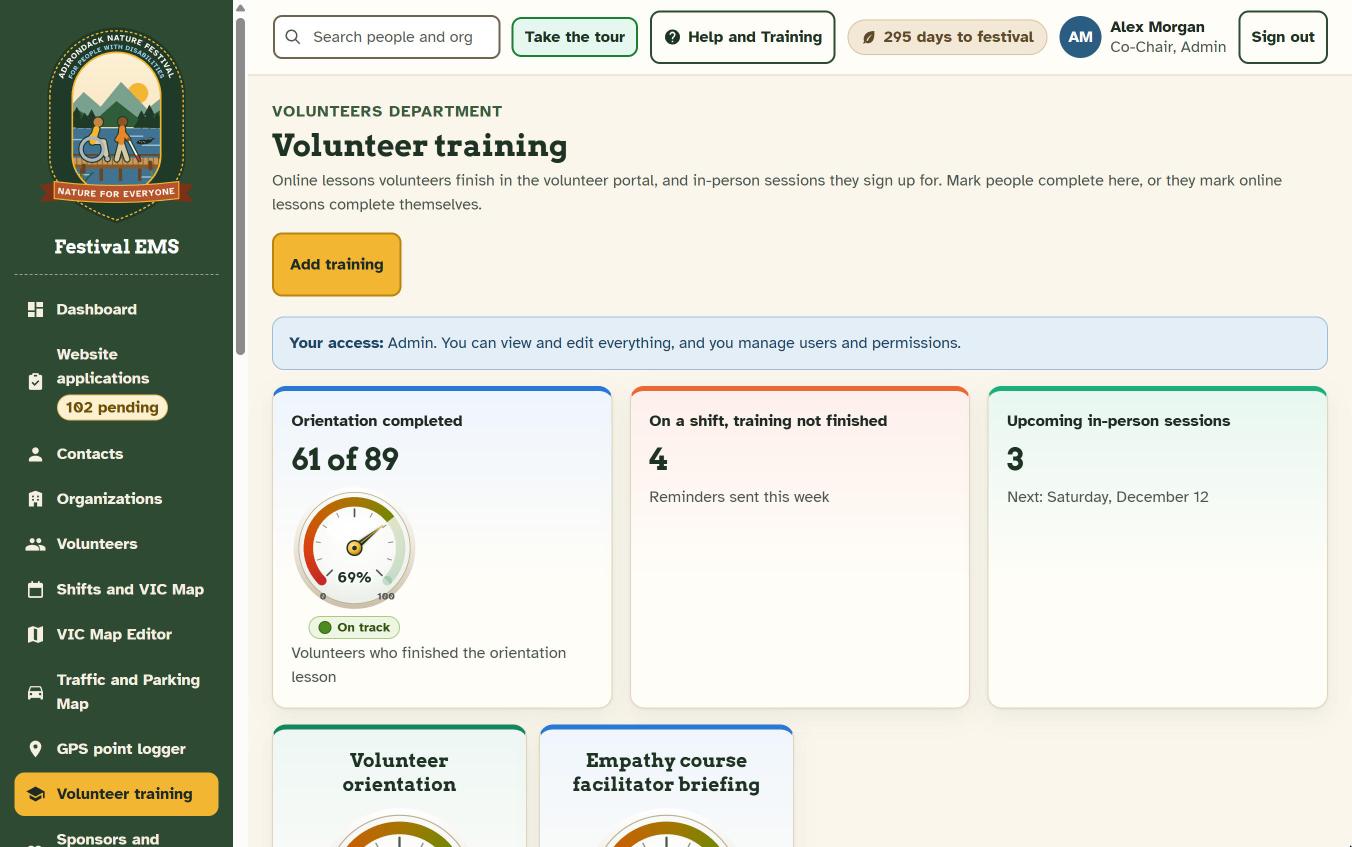
Training
Volunteer training
Online lessons volunteers finish in their portal, plus in-person sessions they sign up for. Coordinators see who still needs training before their shift and when the next session meets.
Website formsSign-ups arrive ready to approve
EmailWelcome notes and reminders
Your systemEverything in one place
Text messagesShift reminders on every phone
PaymentsFees and orders paid online
Integration
Connected to the tools you already use
Custom software earns its keep when it works with everything around it. Information is entered once and shows up wherever it is needed: on your website, in email and on the phones your team carries.
Website
Website forms
Sign-ups and applications go straight in as pending, ready to approve.
Email and replies
Approval, welcome and reminder emails sent from inside the system.
Payments
Online payments
Fees and donations through services such as PayPal, recorded as they arrive.
Maps
Maps and GPS
Interactive site maps, stations and GPS points logged on location.
Your custom software
One secure system at the center
Documents
Scripts and documents
Final Draft script files, signed releases and PDF exports.
Data
Spreadsheets and imports
Bring in years of records from spreadsheets, and export them any time.
Devices
Phones and tablets
Check-in screens and field tools that keep working when the signal drops.
Messages
Text message reminders
Opt-in texts for shift reminders, call times and changes on the day.
What we build
Software for the work that keeps you busy
Production
Project and production management
Tasks, schedules, budgets and documents for every project, with live indicators that show what needs attention.
Events
Event and volunteer management
Sign-ups, shifts, training, check-in and maps for festivals, races, conferences and fundraisers.
Scheduling
Scheduling and Gantt charts
Drag a task to a new date and see conflicts and prerequisites right away, by mouse, touch or keyboard.
Portals
Portals for volunteers, members and clients
People sign in to manage their own shifts, forms and files, so your staff answer fewer emails.
Dashboards
Dashboards and reports
Gauges, charts and tables built from your own records, ready for board meetings and grant reports.
Field tools
Tools for phones and tablets
Check-in screens, GPS point logging and signed releases that work on location, even with spotty cell service.
Accessible for everyone
ADA/WCAG compliant behind the scenes too
Your staff and volunteers use the system every day, and some of them use screen readers, magnification, voice control or a keyboard instead of a mouse. We build every screen to WCAG 2.2 AA, from public sign-up forms to staff dashboards.
- Text at 16 pixels or larger, with strong color contrast
- Charts and gauges that also show their numbers as a table
- Color never carries meaning on its own; every status is written out in words
- Full keyboard use, including drag-and-drop tools like the Gantt chart
- Tested by hand with JAWS, NVDA, VoiceOver and TalkBack, the screen readers people with disabilities use every day
Privacy and security
Private information, kept private
Custom systems often hold names, phone numbers, schedules, payments and signed documents. We protect them the same way on every project.
- Each person sees only what their role allows, set department by department
- Two-step sign-in with an authenticator app for staff accounts
- A sign-in record showing who signed in, when and from where
- One active session per account, so logins are not shared
- Regular backups, and your data belongs to you
How a project runs
From the first conversation to the first sign-in
1
Listen
We learn how your work happens today, including the spreadsheets and workarounds.
2
Plan
A written plan of features, screens and connections, so everyone knows what is being built.
3
Build in stages
Core screens first, so your team can use them and tell us what to change.
4
Train and launch
Hands-on training for staff and volunteers, plus written help inside the system.
5
Grow
New features as your needs change, built on the same foundation.
Custom software questions
What clients ask us
What is custom software development?
Custom software is written for one organization and the way it works, instead of being sold to thousands of customers at once. You get the screens, steps, wording and reports your team needs, and nothing you do not.
How is this different from a CRM system?
A CRM keeps track of the people you work with and everything connected to them. Custom software can run a whole operation, such as a film production or a festival, with its own scheduling, documents, maps and field tools. Many of our systems include a CRM as one part.
Will it work with our website?
Yes. Forms on your website can feed the system directly, and the system can show information back on your website, such as schedules, maps or sign-up openings, from the same records.
Does it work on phones and tablets?
Yes. Every screen adjusts to phones, tablets and computers, and field tools such as check-in screens are designed for use on location.
What does custom software cost?
Every system is different, so we price each one after we learn what you need. A conversation and a written plan come first, and you decide what is included.
Do you train our staff and volunteers?
Yes. We provide hands-on training when the system launches, help pages inside the system, and ADA/WCAG training for anyone who adds content the public will see.
Have a process that outgrew its spreadsheet?
Tell us how your work runs today and where it gets stuck. We will show you what a system built for it could look like.